Private Tutor Workspace  ·  Classes, lessons, video, and AI

Teach, manage, and grow your tutoring from
one intelligent workspace

Manage students, classes, lesson materials, schedules, communication, browser video calls, AI-assisted learning, and progress tracking in one beautiful workspace built for private tutors and language teachers.

Request a Demo

Built for private tutors, language teachers, small academies, online cohorts, and independent teaching teams.
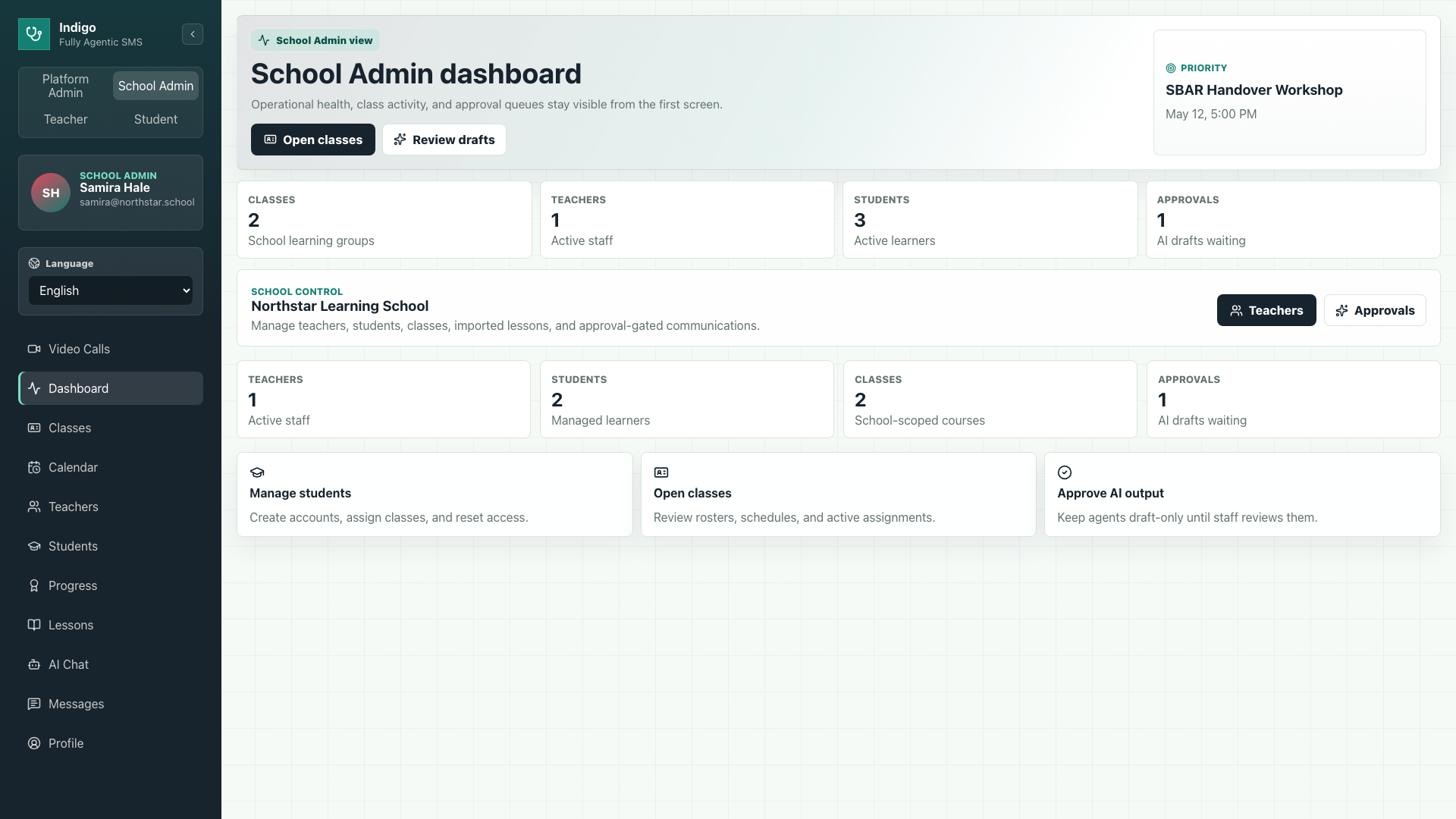
Real Mentors school admin dashboard screenshot
SA
Sarah Admin
School Admin
Good morning, Sarah ☀️
Monday, May 11 · Spring Term 2026
SA
Active Students
284
↑ +12 this week
Active Classes
18
3 today
Pending Approvals
3
⚠ Action needed
Lessons Completed
1,240
↑ +84 today
Class Progress 6 classes
B1
B2
C1
A2
Adv
Int
Upcoming Sessions
Business English B2
Today · 10:00 AM
Advanced Writing C1
Today · 2:00 PM
IELTS Prep A2
Tomorrow · 9:00 AM
Recent Approvals 3 Pending
LessonByTypeStatus
Business Email WritingJ. MorrisAI DraftPendingReview →
Formal CommunicationK. TorresImportPendingReview →
IELTS Speaking ModuleR. PatelAI DraftApprovedView
0
Tutors & Teams
0
Learners Supported
0
Live Classes
0
Lessons Delivered
99.9%
Uptime SLA
Built for real teaching

A beautiful home base for private tutors and language classes

Mentors brings the everyday tutoring workflow together: teach live, manage classes and students, bring your own lesson materials, assign practice, and support learners with integrated AI help between sessions.

Teach any languageRun English, Spanish, IELTS, business, medical, or custom language programs from one workspace.
Bring your lessonsUpload, import, or draft lesson content, then organize it by level, class, or individual student.
Meet in video roomsLaunch browser-based 1:1 tutoring or group classes directly from schedules and messages.
Help students learnAI study chat, explanations, progress, feedback, and vocabulary support keep students moving.
Tutor working with students around a table
Manage real classesPhoto source: Unsplash
Online learning on a laptop
Teach onlinePhoto source: Unsplash
Teacher helping students in a classroom
Support every learnerPhoto source: Unsplash
Captured from the app

See the real Mentors workspace in action

Product screenshots show how tutors manage students, class rosters, lesson libraries, assignments, and learner progress inside the running Mentors app.

Real Mentors admin dashboard screenshot
Admin Dashboard Operational health, classes, and approvals are visible from the first screen.
Platform Overview

One connected system for tutoring operations and learning

Mentors connects every layer of your tutoring workflow — from student intake and class management to lesson delivery, live sessions, and student progress — in a single role-aware workspace.

Role-Based Workspaces

Every user gets a workspace scoped to their role — platform admin, school admin, teacher, or student. No shared screens, no excess access.

School-Scoped Data

All data is isolated by school tenant. Secure, clean, and auditable by default. Each school sees only its own students, teachers, and content.

Real-Time Collaboration

Live updates across dashboards, messages, approvals, and lesson progress without a page reload. Your team always sees current state.

Operations Hub

Full control over your students, classes, and teaching structure

Create student accounts, manage access, archive records, organize cohorts, and configure your teaching profile, timezone, and locale from one admin panel.

  • Private tutor, small academy, and teaching-team modes
  • Student account provisioning and optional teacher collaborators
  • Username/password student access + Staff SSO
  • Archive and reactivate accounts instantly
  • Password reset workflows without plaintext storage
  • AI draft and communication approval queues
  • Tutor profile, timezone, and locale settings
User Management
284 Active 12 Pending
All roles ▾
Status ▾
NameRoleStatus
JM
James Morris
j.morris@academy.edu
TeacherActiveEdit
KT
Keiko Torres
keiko.t@academy.edu
TeacherActiveEdit
RP
Ravi Patel
ravi.p@academy.edu
StudentPendingActivate
AL
Aiko Lin
aiko.l@academy.edu
StudentActiveEdit
SB
Sofia Brennan
s.brennan@academy.edu
AdminActiveEdit
Business English B2
JM
J. Morris
👥 24 students
📅 Mon/Wed · 10:00 AM
Active
Advanced Writing C1
KT
K. Torres
👥 18 students
📅 Tue/Thu · 2:00 PM
Active
IELTS Prep A2
RP
R. Patel
👥 31 students
📅 Mon/Fri · 9:00 AM
Scheduled
Beginner Spanish A1
AL
A. Lin
👥 14 students
📅 Wed/Fri · 11:00 AM
Active
Classes & Rosters

Build and manage classes with full roster control

Create classes, assign teachers, enroll students, set schedules, and track assignments from a single class management view.

  • Create and edit classes with subject, level, and status
  • Assign teachers and enroll student rosters
  • Add recurring weekly schedules
  • Track active enrollments and class assignments
  • Set classes to active, scheduled, or archived
Lessons & Curriculum

Bring your own lessons or build new ones with AI support

Bring your existing lesson materials, build from templates, create tutor-owned lessons, import drafts with AI assistance, and assign lessons to classes or individual students.

  • Global reusable lesson catalog (A0–C2 levels)
  • Tutor-owned lesson library for your materials
  • AI-assisted lesson draft import with approval
  • Objectives, vocabulary, practice tasks, and rubrics
  • Published and draft lesson states
  • Assignment by class or selected students
  • Student lesson runner with completion tracking
Lesson Library
Level ▾
Status ▾
TitleLevelTypeStatus
Business Email Writing
3 classes
B2TemplatePublishedAssign
Formal Report Writing
1 class
C1School-ownedPublishedAssign
IELTS Speaking Strategies
Not assigned
A2AI DraftPendingReview
Present Perfect Tense
4 classes
B1TemplatePublishedAssign
Academic Vocabulary Unit 3
Not assigned
C1School-ownedDraftEdit
Student Workspace

A focused learning experience students actually use

Students see assigned lessons, upcoming sessions, progress stats, tutor feedback, and AI study support — all in one clean personal workspace.

📚
Assigned Lessons
Progress tracked per lesson
🎯
XP & Streaks
Motivating progress metrics
📅
Live Sessions
Upcoming class calendar
🤖
AI Study Chat
On-demand study support
📝
Vocabulary Notebook
Save and review key terms
💬
Tutor Messaging
Direct in-app communication
1,240
XP Earned
🔥 14
Day Streak
88%
Accuracy
12
Done
My Lessons
Business Email Writing
72%
Present Perfect Tense
Complete ✓
IELTS Speaking Strategies
30%
Upcoming Sessions
Business English B2
Today · 10:00 AM
Advanced Writing C1
Today · 2:00 PM
Teacher Dashboard
My Classes
Business English B2
24 students · Today 10:00 AM
Active
Advanced Writing C1
18 students · Today 2:00 PM
Active
Student Progress
⚑ 2 flagged
StudentCompletionAccuracy
RP
Ravi Patel
85%
92%View
AL
Aiko Lin
42%
61%⚑ Flag
SB
Sofia Brennan
100%
96%View
Teacher Workspace

Everything a tutor needs to track, teach, and communicate

Tutors get a workspace with class overviews, per-student progress, lesson management, messaging, scheduling, and one-click live session launch.

  • Class overview with enrollment and schedule
  • Student progress and completion rates
  • Learner watchlist with accuracy insights
  • Lesson import and assignment tools
  • Direct and group messaging
  • Calendar and session scheduling
  • Live video room launch
Calendar & Scheduling

Schedule sessions, classes, and events in one place

Week, month, and agenda views with class sessions, video lessons, RSVP invites, and direct video room launch from any event.

May 2026
Mon
Tue
Wed
Thu
Fri
Sat
Sun
5
6
7
Business Eng
8
9
Adv Writing
10
11
12
Business Eng
IELTS Prep
13
Spanish A1
14
Business Eng
15
Adv Writing
16
IELTS Prep
Spanish A1
17
18
19
Business Eng
20
Spanish A1
21
Business Eng
22
Adv Writing
23
IELTS Prep
24
25
Messaging & Announcements

Direct, group, and class communication in one inbox

Direct messages, class announcements, and group threads. Admin-gated communications keep outbound messaging reviewed before sending.

  • Direct messages between staff and students
  • Group and class thread conversations
  • Push notifications with read state tracking
  • Video invite links inside threads
  • Communication drafts with admin approval
  • Announcement broadcasts to full classes
Messages
5 unread
JM
James Morris
Can you review the lesson?
2
B2
Business Eng B2
Session starts at 10 AM
RP
Ravi Patel
Thank you for the feedback!
C1
Adv Writing C1
Assignment due Friday
3
JM
James Morris
● Online
Hi Sarah, can you review the new lesson draft? I submitted it for approval.
Sure! I'll take a look now. Give me a few minutes.
Great! Also, the B2 session is at 10 AM — I'll send the room link shortly.
Perfect. Also flagged: Aiko Lin hasn't completed the last two lessons.
James is typing...
Write a message...
Live Classes & Video Rooms

Secure browser-based video rooms for any learning session

Tutoring sessions, group classes, office hours, and interviews — all in your browser. No app install. Room links, participant presence, and live status built in.

Group Classes

Host full class sessions in a browser video room. Participants join via a shareable room link with live presence tracking.

● Live now24 participants

1-on-1 Tutoring

Teachers and students open a private room for focused tutoring, feedback sessions, or interview prep.

Private roomInvite link

Scheduled Sessions

Rooms are created from calendar events and appear on dashboards. Join with one click at session time.

RSVP enabledCalendar linked
Business English B2 — Live Session
● 24 present45:12
JM
J. Morris (Teacher)
🎤 📹
RP
Ravi Patel
🎤 📹
AL
Aiko Lin
🔇 📹
+21
more participants
AI Assistance

AI that supports your school workflow — not replaces it

AI in Mentors is a productivity layer. Guardrails keep it academic and role-aware. Every AI-generated output goes through staff review before reaching students.

  • Students ask study questions in a saved AI chat
  • Selected-text explanations assist comprehension
  • Tutors generate lesson drafts from their own source material
  • AI-generated lessons require staff approval before publishing
  • Communication drafts can be AI-assisted and admin-reviewed
  • AI credentials stay server-side — never browser-exposed
🛡
Draft → Review → Approve
AI-generated content goes through an approval queue. Admins and teachers review every draft before it reaches students or goes live.
AI Study Chat
Student workspace
What's the difference between "will" and "going to"?
"Will" = spontaneous decisions and predictions. "Going to" = planned intentions. Example: "I'll help you" (spontaneous) vs "I'm going to study tonight" (planned).
Ask a study question...
Lesson Approval Queue3 Pending
📄
Business Email Writing
AI Draft · J. Morris · 2h ago
IELTS Speaking Module
Approved · Published · Ready to assign
Live
Progress Analytics

Real-time visibility into every learner, class, and metric

Admins and teachers see active learners, completion rates, accuracy, XP, streaks, pending approvals, and upcoming sessions at a glance.

📈
0
Active Learners
↑ 12 this week
0
Lessons Completed
↑ 84 today
🎯
87%
Avg Accuracy
↑ 3% vs last week
3
Pending Approvals
Action needed
Weekly Lesson Completions
Last 8 weeks
CompletionsAccuracy %
W1
W2
W3
W4
W5
W6
W7
W8
Role-Based Workspaces

One platform, four distinct workspaces

Every role gets exactly the access and tools they need — nothing more, nothing less.

🏛
Platform Admin
Full Platform Control
  • Manage schools and tenants
  • Create school admins
  • Cross-school visibility
  • Platform health and config
  • Global curriculum catalog
🏫
School Admin
School Operations
  • Manage teachers and students
  • Approve AI drafts
  • Oversee communications
  • Class and roster control
  • School-wide analytics
👩‍🏫
Teacher
Teaching & Tracking
  • Manage classes and rosters
  • Import and assign lessons
  • Track student progress
  • Message students
  • Launch live video sessions
🎓
Student
Learning Workspace
  • Complete assigned lessons
  • Join live sessions
  • Track XP and streaks
  • Message teachers
  • Use AI study chat
Security & Infrastructure

Built for schools that need to trust their software

Every layer of Mentors is built with security-first defaults — from authentication to data access, AI integration, and file storage.

🔐
Secure Auth
Active-user checks on every session
🏫
School-Scoped
Data isolation per school tenant
🧱
Role Permissions
Granular access by user role
☁️
Cloud Functions
Protected backend, no client secrets
🔔
Push Notifications
Real-time alerts without polling
🎥
Secure Video
Server-issued LiveKit tokens
Powered by

Firebase secure cloud functions, real-time Firestore, push notifications, LiveKit video, and server-side Gemini AI integration. AI and video credentials never leave the server.

🔥Firebase
Cloud Functions
📊Firestore
🔔FCM Push
🎥LiveKit Video
Gemini AI
Get Started

Bring every part of your school into one connected system

From enrollment and classes to lessons, communication, live sessions, and progress — your team gets one place to run the school.

Request a Demo

No credit card required. Setup in under 30 minutes.